
← Files Product Idea PackARCHIVED FILE
skills/product-idea-pack/README.md
20 KB · Oct 5, 2026 · 18:33 UTC
# Product Idea Pack Product Idea Pack is a reusable Agent Skill for turning an early digital-product idea into visual, editable artefacts that people can share, discuss and challenge. It can work from a conversation, transcript or brief, helping a team create a useful discussion object without spending a day starting from a blank page. It can create a proposition sketch, mechanism board, product storyboard, interactive HTML prototype, or a connected pack of several formats. These can complement a brief, research summary, strategy or proposal by giving people a concrete expression of the idea. Every output is deliberately open to change: clear enough to make the proposition tangible, editable enough to refine, and unfinished enough for somebody to disagree with it. The skill itself follows the same principle. Format guidance, house style, templates, branding and delivery packaging are separate layers, so a team can adapt the method without rewriting it end to end. [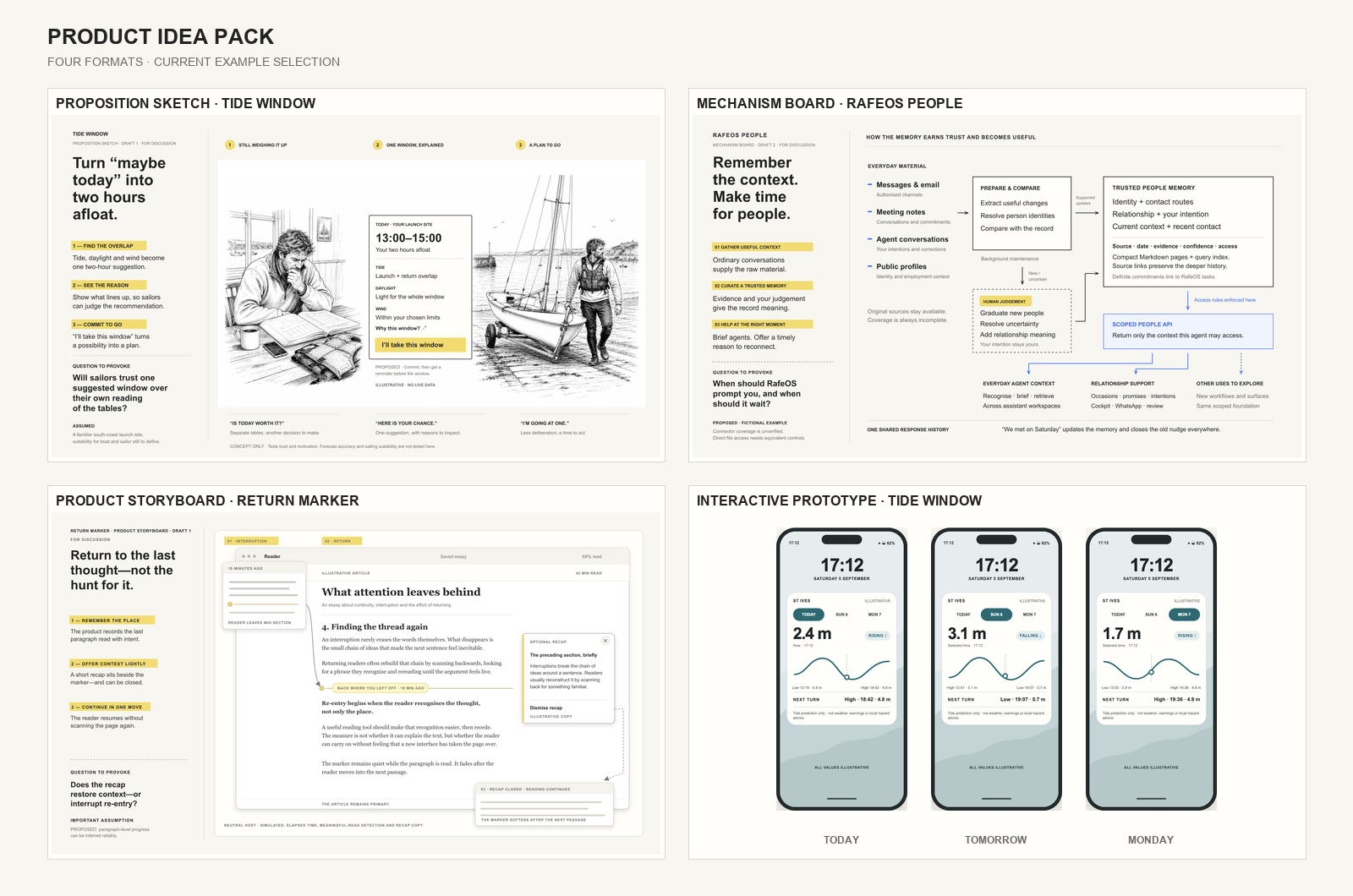](https://github.com/rafeblandford/skills/tree/main/examples/product-idea-pack) [Read the website guide](https://rafeblandford.com/product-idea-pack/) · [Read why the skill was made](https://rafeblandford.com/making-product-ideas-visible/) ## Start here - [Choose the question and format](#four-formats) - [Give the skill an idea](#three-ways-to-begin) - [See worked examples](#examples) - [Customise the pack](#customising-the-pack) - [Install it](#installation) ## What it is for The skill reduces the time needed to make a product idea visible and discussable. It helps you: - make a product proposition visible quickly; - expose a mechanism, hand-off or weak link before polishing the interface; - compare different manifestations of one idea; - capture a concept in editable and shareable forms; - create a visual complement to a brief, research note, proposal or workshop; - move from a loose thought to a prototype through short human critique rounds. You might use it alone to create and develop an idea, but it also works well in a workshop or group discussion: capture ideas quickly, turn the discussion into something visual, and leave with an artefact that can be shared with stakeholders. It is not a substitute for product judgement, research, design craft or testing with the people affected. It accelerates ideation and concept capture. A human still decides what matters, challenges the assumptions and chooses what to take forward. ## Four formats | Format | Use it to ask | Typical output | | --- | --- | --- | | **Proposition sketch** | Is this an interesting change for somebody? | A scanned-ink sketch page with a clear proposition, three beats, a question and notes | | **Mechanism board** | How does it work, and where could it fail? | An editable line board of actors, relationships, hand-offs, assumptions and weak links | | **Product storyboard** | Could this become a believable product experience? | A situated sequence of connected product moments | | **Interactive prototype** | Does the behaviour make sense when operated? | A standalone HTML artefact with meaningful states and captures where available | This is an increase in commitment, not a compulsory four-step process. Start at the format that answers the question you have now. If the format is unclear, the skill recommends one and briefly explains the closest alternative. ## Three ways to begin ### 1. Talk first, then invoke the skill Use an ordinary conversation to work through the idea. When it is ready to make visible, say: > Use Product Idea Pack with the idea we have been discussing. Recommend the > right format, carry forward the decisions already made, and ask only if a > missing answer would materially change the result. This is often the best route because the conversation already contains the audience, tension, mechanism and open questions. A transcript from a recorded discussion can provide the same starting context; ask the skill to reconstruct the brief and distinguish what participants said from what it has inferred. ### 2. Give it a brief If you know what you want, name the format and provide the important constraints: > Use Product Idea Pack to create a proposition sketch for Tide Window. Weekend > dinghy sailors struggle to decide whether today is worth the effort. The > product proposes one two-hour window where tide, daylight and wind line up, > explains why, and lets the sailor commit to it. The question is whether people > will trust one recommendation over their own reading of the tables. Treat all > values as illustrative and do not imply safety advice. Draft 1, default house > style, no branding. The format is already resolved, so the skill can move directly to its direction checkpoint and creation. ### 3. Ask it to guide you You can start with very little: > Use Product Idea Pack to help me turn a rough product idea into something I can > discuss. Ask me the one most useful question, recommend a format, and explain > what you are inferring. The skill is designed to keep this fast. It should not turn intake into a long questionnaire. ## What determines the result Short prompts are valid, but they give the agent more room to invent. The most useful inputs are: - **who it is for** and the situation they are in; - **what changes** for them if the idea exists; - the **distinctive mechanism or interaction**, if known; - the **question the artefact should provoke**; - the desired **format or use**, if already decided; - facts, constraints and things the concept must not imply; - a reference screenshot, parallel product or visual example when it would reduce invention; - what you want to borrow from a reference, and what you want to avoid. You do not need a final name, format or version. The skill can infer a working name and starts at Draft 1. Material inferred mechanisms should be labelled **Proposed** on the artefact rather than presented as settled product truth. ### A reusable brief template ```text Idea: Audience and situation: What changes for them: Important mechanism or interaction: Question to provoke: Known facts and constraints: What must not be implied: Preferred format or intended use (optional): References and what to borrow or avoid (optional): Output location or delivery needs (optional): ``` ## References help when they have a job A reference is useful when it reduces a specific uncertainty. It can be: - a **host reference** showing the product or service the idea must fit into; - a **functional precedent** showing a useful interaction or information pattern; - a **treatment reference** showing the desired visual character. Supply the image or file and say what matters about it. “Use the density and phone proportions, but not the colour palette” is far more useful than “make it like this”. If no reference is supplied, the default house style is restrained, editorial and intentionally low-fidelity. ## Expect a conversation, not a one-shot design service Draft 1 is a concrete object for critique. Useful feedback is specific: - “The sketch explains the situation but not the product intervention.” - “Keep Draft 1. In Draft 2, make the lender's risk the second beat.” - “The phone is too dominant; preserve the copy and rebalance the composition.” - “Translate this accepted mechanism board into an interactive prototype.” The skill preserves earlier accepted drafts when the draft number changes and records material human decisions. Translating an idea into another format is not treated as a revision: each format answers a different question. ## How long it takes In the release tests, a typical generation or revision turn took approximately **15–20 minutes**. Image generation, the number of boards, browser testing and destination hand-offs can make an individual turn shorter or longer. This is an observed range, not a performance guarantee. The RafeOS People example began with an exploratory discussion, then used three main production turns of approximately 17, 20 and 22 minutes. In about an hour of agent runtime—plus the preceding conversation and human pauses—it produced five concept boards, a cover, PDF and editable Figma hand-off. I estimate that a comparable multi-board pack could take a working day or longer to produce manually; that is an informed personal comparison rather than a controlled benchmark. Speed is useful because it creates a concrete object while the idea is still cheap to change. Treat every board as stimulus, inspect it closely and apply human judgement. The first output may need changes to its proposition, language, density or framing before it is appropriate for a particular audience. ## Examples The published examples deliberately cover different starting points and levels of human intervention. | Example | What it demonstrates | | --- | --- | | [RafeOS People](https://github.com/rafeblandford/skills/tree/main/examples/product-idea-pack#rafeos-people) | The hero example: a longer conversation, structured brief, three formats, two human-feedback rounds and a verified Figma hand-off | | [Tide Window](https://github.com/rafeblandford/skills/tree/main/examples/product-idea-pack#tide-window) | A one-shot proposition sketch, plus a later four-format revision including an interactive prototype | | [Return Marker](https://github.com/rafeblandford/skills/tree/main/examples/product-idea-pack#return-marker) | A one-shot product storyboard with zero human-feedback rounds, showing a specific feature inside a neutral host product | | [RafeOS Delta Brief](https://github.com/rafeblandford/skills/tree/main/examples/product-idea-pack#rafeos-delta-brief) | A thin brief where the skill selected an interactive prototype and the number of states | Here, “one-shot” means zero human-feedback rounds: the agent received no critique between the saved prompt and Draft 1. It does not mean one model call, no human input to the brief or no autonomous rendering and layout QA. ## Core and optional outputs Static formats normally include an editable SVG and a presentation-ready PNG. Interactive prototypes include standalone HTML and state captures where a browser capture capability is available. Multi-format packs also keep a brief, decisions and evaluation record. After an artefact is accepted, the skill can optionally produce: - a **presentation profile**: placed-vector PowerPoint plus matching PDF; - a **design-handoff profile**: normalised SVGs, reference PNGs and import notes for tools such as Figma. The four formats and two hand-off profiles are supported defaults, not a closed catalogue of everything the skill may create. You can request another board, layout or piece of packaging when it helps a particular discussion. Additional artefacts are strongest after one or more core boards have established the proposition, language, mechanism and visual rules that they should inherit. The [RafeOS People case study](https://github.com/rafeblandford/skills/tree/main/examples/product-idea-pack/rafeos-people) shows this distinction: its native product preview and cover are useful additional boards, but they are not treated as fifth and sixth core formats. ## Customising the pack The pack separates its decisions into layers so that you can change the smallest relevant part without rewriting the whole skill. | Layer | What it controls | Starting point | | --- | --- | --- | | **Format guidance** | The learning question, content and required files for each kind of artefact | [Format references](references/formats/) | | **House style** | Page anatomy, spacing, palette, typography, annotation and editorial rhythm | [Default house style](references/house-styles/default-v2.md) | | **Templates** | Repeatable SVG or HTML scaffolds and starting geometry | [Template assets](assets/templates/) | | **Brand profile** | Approved marks, wordmark, type and colour roles applied as an overlay | [Brand profile guide](references/brand-profile.md) | | **Output profile** | Packaging for presentation or onward design work | [Output profile guide](references/output-profiles.md) | ### Additional boards and layouts Ask for an additional board by naming its purpose and audience: for example, a cover, native product preview, workshop summary, role-specific extract or a different overview layout. Say which accepted artefacts it should use as source material and whether it is another feedback object or simply packaging. The skill should carry forward the brief, decisions, truth labels and house style rather than reinventing the idea. ### House styles and templates A house style controls both appearance and editorial behaviour: colour roles, typography, margins, density, page anatomy, connector treatment and the order in which explanation is presented. The default is `editorial-instrument@2`. To create a different visual system, duplicate the default house-style reference, give it a new versioned identifier and describe the roles you want each choice to play. In a personal fork you can then make that style the default, or name it in an individual request. Keeping it as a separate reference makes later changes consistent across every format. Templates are starting scaffolds rather than fixed designs. Copy or adapt one when you want repeatable canvas geometry, wrappers or document structure. Change the house style for a new visual language; change a template when you want a new repeatable layout. The format references should continue to describe what each artefact is for. ### Branding Branding is separate from the output profiles and is never applied by default. Ask for a named brand profile when creating or revising an artefact and the skill will apply its logo, wordmark, colour roles and placement rules to the appropriate editorial wrapper and hand-off files. It does not stamp a logo inside a neutral or third-party product surface. An example `rafeblandford@1` profile is included. You can edit or duplicate it to make another profile using your own cleared brand assets and guidance. ### Agent-agnostic structure The core follows the open [Agent Skills specification](https://github.com/agentskills/agentskills/blob/main/docs/specification.mdx): instructions live in `SKILL.md`, conditional guidance in `references/`, reusable starting points in `assets/`, and deterministic helpers in `scripts/`. It describes required capabilities instead of hard-coding one provider's tool names. Installation packaging is kept outside the core skill. This makes the method portable, not identical in every client. Models, image generation, browser control and design-tool connections still affect the result. Forking and modification are encouraged under the Apache 2.0 licence: preserve the layer boundaries, change the part that represents your practice, and test the result in the agent environments you intend to use. ## Installation ### Quickest cross-client route If you use the community `skills` installer and have Node.js available: ```sh npx skills add rafeblandford/skills ``` Choose `product-idea-pack` when prompted, then start a new agent session. ### Codex The simplest route is to ask Codex: > Install the `product-idea-pack` skill from > `https://github.com/rafeblandford/skills/tree/main/skills/product-idea-pack`. For a manual personal installation, copy the complete `skills/product-idea-pack/` folder to `~/.codex/skills/product-idea-pack/` and start a new task. For a project-local installation in a compatible client, place it at `.agents/skills/product-idea-pack/` in that project. Codex currently provides the strongest complete proposition-sketch route when its image-generation capability is available. ### Claude Code Add the public marketplace, then install the plugin: ```text /plugin marketplace add rafeblandford/skills /plugin install product-idea-pack@rafeblandford ``` Start a new session or run `/reload-plugins`. The explicit invocation is `/product-idea-pack:product-idea-pack`, although Claude can also select the skill from an ordinary matching request. ### Claude Cowork Download `product-idea-pack.plugin` from the [Product Idea Pack v0.1.2 release](https://github.com/rafeblandford/skills/releases/tag/product-idea-pack-v0.1.2), open **Customize → Plugins**, and upload the file. Start a fresh Cowork session after replacing an older version. ### Other Agent Skills clients Install or copy the complete `skills/product-idea-pack/` directory using your client's normal Agent Skills mechanism. Keep the folder intact: the skill routes to its references, templates and helper scripts at run time. For manual installation, the latest GitHub release also provides a skill-only ZIP whose top-level folder is `product-idea-pack/`. ## A quick installation test Start a new session and try: > Use Product Idea Pack. I have an idea for neighbours to borrow rarely used > household tools. I want something I can show two friends, but I have not chosen > a format. Recommend where to start and explain the closest alternative. The skill should recommend one format and wait for your choice. If it immediately builds an HTML prototype, the skill has not loaded correctly or another instruction is overriding it. ## Capability differences The underlying method is provider-neutral, but the tools are not identical. If you have a choice, I recommend using ChatGPT/Codex for complete visual packs: its image-generation tools are an important part of the proposition-sketch and product-storyboard routes. Claude Code and Cowork did not expose native text-to-image generation in the release tests. For a proposition sketch they therefore stop before composition and offer three honest routes: generate the ink layer elsewhere, supply an existing sketch, or accept a visibly incomplete ink field. Mechanism boards, storyboards and HTML prototypes remain usable through the capabilities present, although a storyboard may be less visually expressive without generated imagery. Missing convenience exports are disclosed rather than faked. The editable source remains the primary deliverable. ## Connected tools improve the hand-off The skill works from capabilities rather than requiring one provider's tool names. Connections and local tools improve particular parts of the workflow: - **Image generation** makes scanned proposition sketches, illustrative storyboards and optional covers possible. - **Browser automation** can operate HTML states, check narrow layouts and console errors, and create consistent prototype captures. - **A connected design tool such as Figma** allows the agent to import the hand-off, check fonts, groups and arrows in the actual destination, and leave an editable file. Without that connection, the skill supplies portable, normalised SVGs and import notes. - **Presentation and PDF renderers** allow PowerPoint and PDF outputs to be compared with the approved source boards rather than assumed to match. - **Screenshots and host-product references** reduce invention when a concept must sit inside an existing service. The agent should use relevant capabilities when they are already available and requested by the workflow. It does not automatically install packages, connect accounts or broaden access. A missing convenience export is disclosed; a missing capability that defines the chosen format is raised before composition. ## Provenance Product Idea Pack was created through human–AI collaboration. I set the product intent, format taxonomy, house style, quality bar and release decisions through repeated critique. Codex and Claude agents helped research, draft, generate, test and refine the skill and its example artefacts. Published examples record their harness, model and number of human feedback rounds wherever that information is available. This is labelled `written-with-ai`, following [my provenance vocabulary](https://rafeblandford.com/ai-provenance/). ## Licence and feedback Product Idea Pack is available under the Apache License 2.0. You may use it, modify it and distribute derivatives under the licence terms. There is no requirement to tell me that you used it, but I would genuinely like to hear what you made or changed. Open an [issue](https://github.com/rafeblandford/skills/issues) or get in touch through [rafeblandford.com](https://rafeblandford.com/).
SHA-256: 5ea025c0d6db6c8edd1203b99a97965ca20ab723f474589fa2e081233969c151